The Architecture for Running OpenClaw Safely
nilbox provides the most secure environment for running OpenClaw. Without complex setup, it guarantees the same security level with one click on any PC.
The Difficulty of Traditional Installation
Installing OpenClaw directly on your laptop requires quite a bit of preparation.
- Windows: You must first install unfamiliar tools like WSL, Docker, and CLI
- macOS / Linux: Familiar to developers, but the barrier is high for newcomers
- Different OS versions and environments for each user make it difficult to guarantee consistent security
Countless users, countless environments, all with different configurations — taking responsibility for security under these conditions is nearly impossible.
Nilbox's Solution: The Same Environment for Everyone
nilbox provides an identical runtime environment regardless of the user's OS.
- One-click installation on Windows, macOS, or Linux
- One click of the Install button and nilbox takes care of everything
- OpenClaw also installs with a single button click, ready for configuration immediately
- The same Zero Token Architecture guaranteed for all users
Linux for nilbox: A Dedicated Operating System
nilbox bundles Linux for nilbox to guarantee Zero Token Architecture on every PC.
Features
- Based on Debian Linux, optimized for implementing Zero Token Architecture
- Uses Virtual Machine technology to run independently inside your PC
- Users don't need to install or configure anything separately — the nilbox app handles it all
Where is OpenClaw Installed?
OpenClaw is not installed directly on your PC. It is installed and runs only inside Linux for nilbox, which runs as a virtual machine.
- OpenClaw cannot access any directories, files, programs, or information on your PC
- Even if OpenClaw installs a malicious skill, it cannot access your PC's files or information
- Your PC and the OpenClaw runtime environment are completely isolated
A Simple Analogy: How to Put Something in a Refrigerator
How to put an elephant in a refrigerator vs. How to put OpenClaw in a refrigerator
How to Put an Elephant in a Refrigerator
- Open the refrigerator door
- Put the elephant in
- Close the refrigerator door
How to Put OpenClaw in a Refrigerator
- Open the nilbox refrigerator door
- Put OpenClaw in
- Close the refrigerator door
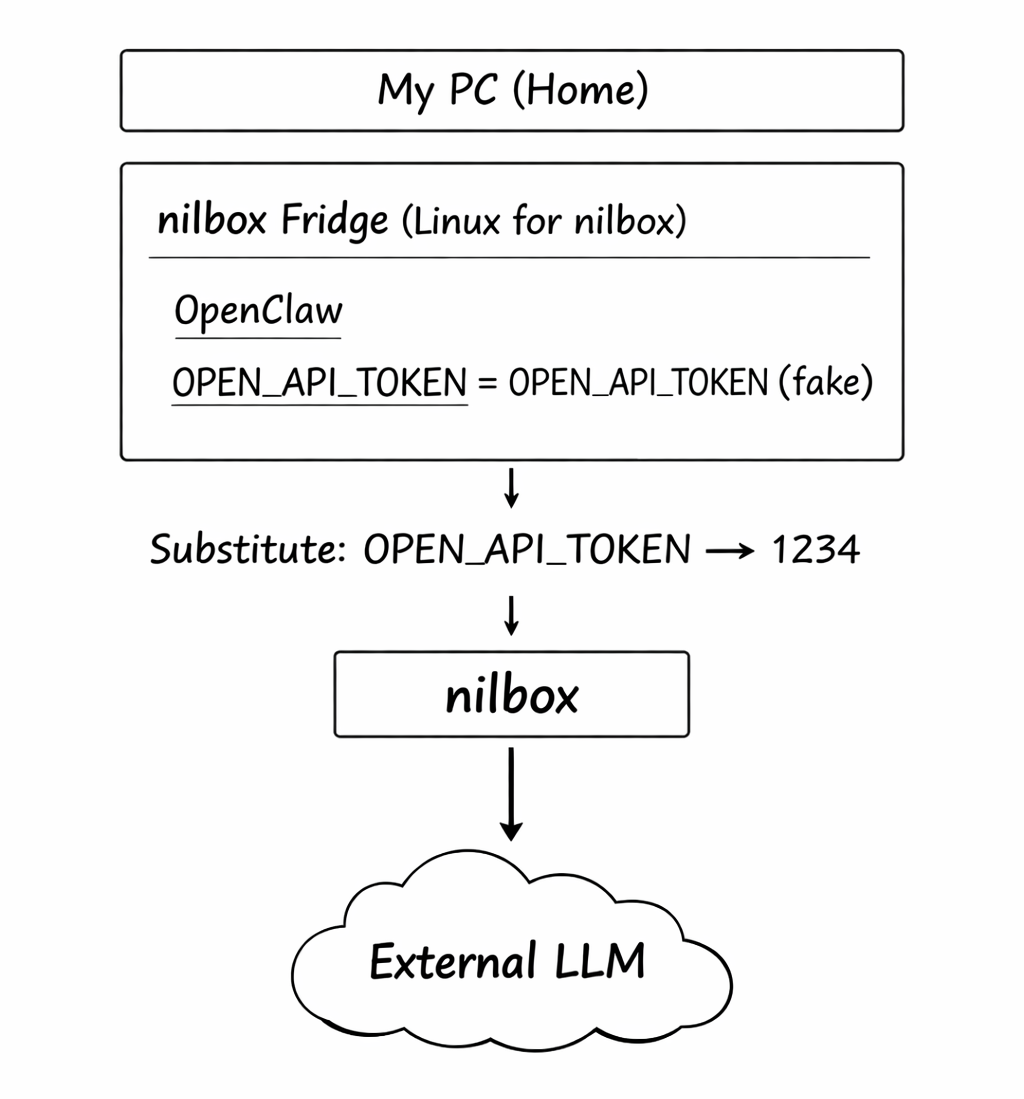
- Your PC = Your home
- nilbox (Linux for nilbox) = The refrigerator
- OpenClaw = What goes inside the refrigerator
OpenClaw only moves inside the refrigerator. No matter how dangerous things get inside the refrigerator, the outside remains safe.
The Token Magic: No Real Token Even Inside the Refrigerator
Isolation alone is not the end. Zero Token Architecture also applies inside the refrigerator.
- The real token value is stored encrypted only in nilbox — a value only you know
- OpenClaw inside Linux for nilbox receives only a fake token:
OPEN_API_TOKEN=OPEN_API_TOKEN - OpenClaw believes the value it received is real and makes calls
- The moment OpenClaw makes an API call, the nilbox refrigerator substitutes the real token value and passes it to the external LLM
Summary
- OpenClaw installation is done with one click from the nilbox app — no WSL, Docker, or CLI needed
- Linux for nilbox is bundled, guaranteeing the same environment regardless of OS
- OpenClaw is isolated inside the virtual machine and cannot access your PC's files or information
- Even inside the isolated environment, Zero Token Architecture ensures the real token is never exposed
- As a result, you can run OpenClaw more securely than anywhere else in the world